Guest EV charging, handled properly
GuestCharge is a production-ready payment layer for OCPP EV chargers.
Hosts want to offer EV charging without:
- Manual billing or invoicing
- Estimating electricity usage
- Awkward payment conversations with guests
GuestCharge connects OCPP chargers to automatic guest payments.
- Charger connects via OCPP
- Usage metered automatically
- Guests pay by card (no app)
- Hosts paid via Stripe
- No setup fees
- No monthly fees
- 10% platform fee on guest charging revenue
- Guests pay standard card processing fees
Works with all OCPP 1.6 and 2.0 compliant EV chargers. 80+ models supported.
Installer responsibilities
Installers remain installers. GuestCharge handles payments and software.
| Handled by GuestCharge |
Not required of installer |
- Guest payments & receipts
- Usage tracking & metering
- QR code generation
- Host dashboard & analytics
- Platform support
|
- Handle payments
- Set pricing
- Troubleshoot billing
- Manage guest issues
- Ongoing software support
|
Installer boundaries
- GuestCharge does not change electrical installation, commissioning, or certification
- Installers may recommend GuestCharge and assist with setup if requested
- Ongoing payments, QR codes, pricing, and support are handled by GuestCharge and the host
- Hosts connect their own Stripe account to receive payouts
- Installers are not responsible for payment setup or issues
- Installers may assist with initial setup if requested by the host
Installer incentive (UK)
Revenue share
- 100% of platform fees for the first 3 months
- 50% of platform fees for the following 9 months
- No limit on the number of chargers onboarded
- No ongoing involvement required
Support
team@guestcharge.co
Charger setup & integration
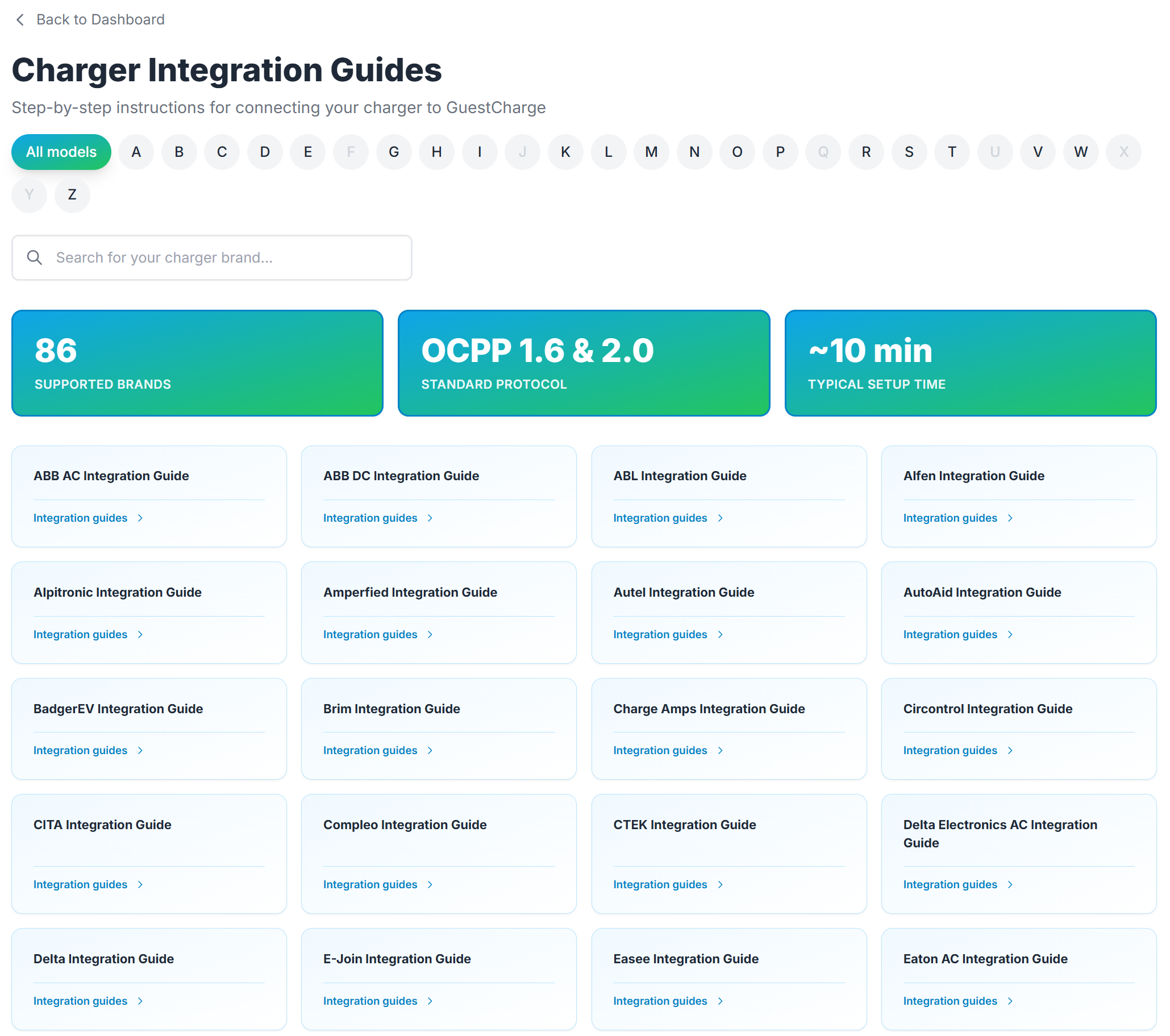
Brand-specific, step-by-step instructions inside the Host Dashboard.
Once a charger is connected, hosts can access brand-specific integration guides directly from their dashboard.
- Installers or hosts create a free account at app.guestcharge.co
- Integration guides are accessed from the dashboard after login
- Typical setup time: ~10 minutes
app.guestcharge.co
Steps
- Log in to the GuestCharge Host Portal
- Select "Integration Guides"
- Follow brand-specific instructions for the charger
Host dashboard example
Charger integration guides
Integration guides are accessed from the GuestCharge host dashboard after account creation. 80+ charger models supported. OCPP 1.6 & 2.0 compatible.
Installer note: Setup is handled by the host. Installers may assist if requested, but are not required to manage ongoing configuration.
QR codes & guest access
QR codes are managed by hosts. Installers are not responsible after setup.
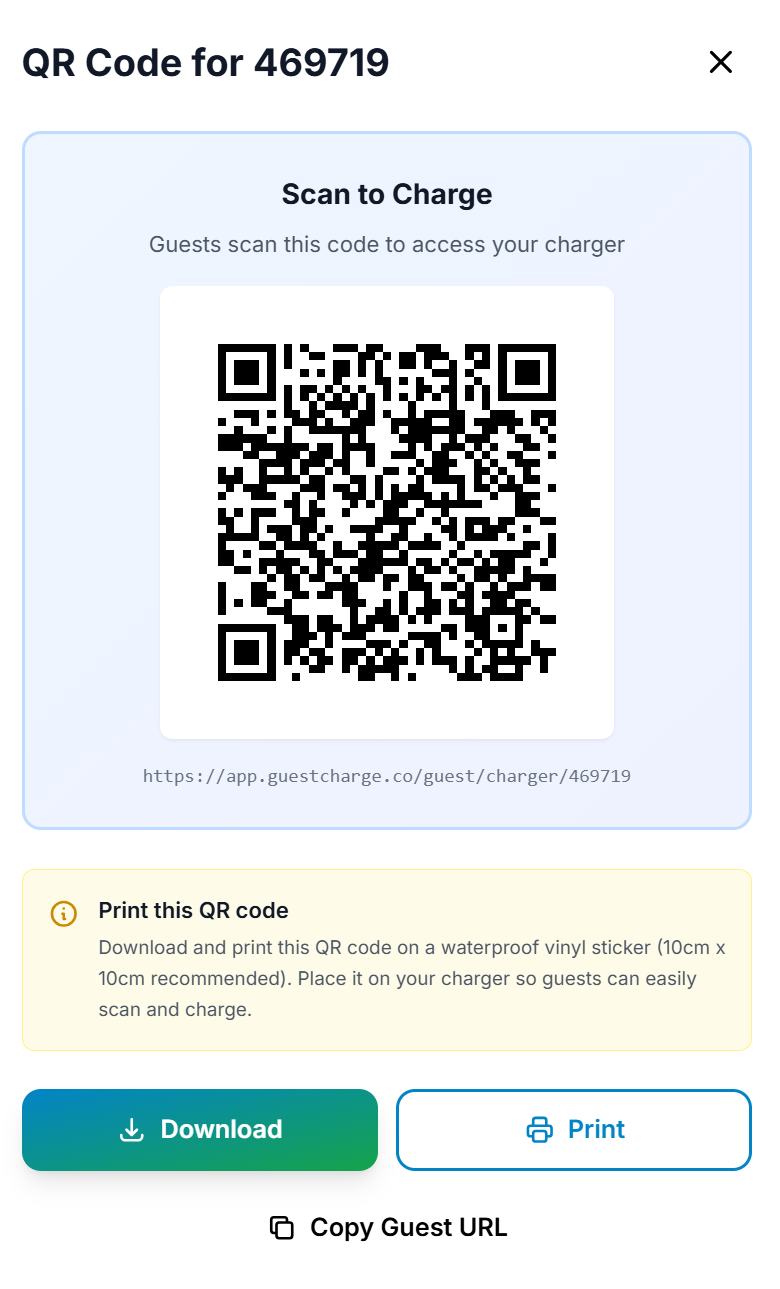
After charger setup, hosts generate QR codes from their dashboard. Guests scan to start a charging session.
- QR codes are generated by the host in the dashboard
- QR codes can be downloaded, printed, or shared digitally
- Physical QR stickers available via GuestCharge support
Host dashboard example
QR code generation
QR codes are generated automatically in the host dashboard. Hosts can download, print, or share digitally.
GuestCharge is designed for situations where guests regularly use private or semi-private EV chargers and payment needs to be handled professionally.
Suitable for
- Airbnbs and short-term holiday lets
- B&Bs, small hotels, and guest houses
- Sports clubs and community venues
- Any property with guest EV charging
Installer role
- Recommend GuestCharge where appropriate
- Assist with setup only if requested
- No ongoing involvement required
Next step
For host onboarding, installer questions, or QR sticker requests, contact GuestCharge directly.
guestcharge.co/contact